Website design platforms.
Hundreds of decisions need to be made before you build a website. The most important – but often overlooked – is which platform you should build in. Each has strengths and weaknesses.
Choose the right platform for your business.
The platform you choose determines how well your website can scale, integrate, and perform over the long term. These pillars summarise the most important considerations.
Platform guidance.
Get clarity on the strengths and weaknesses of each major platform before you commit.
Analyse.
Understand which platforms support your product structure, payment gateways, freight, and growth plan.
Refine.
Choose a platform that grows with your business, not one that limits it.
Not all web platforms are equal.
Do not build your website in a platform simply because it is the only one your web designer knows.
No matter which platform you choose, the reality is a website takes a lot of work in refining your marketing messages and formatting content. With eCommerce, choosing the wrong platform can cripple a business (or worse).
The business processes you need to integrate online to make your business model a success are far more important to consider. Do you need to integrate with your CRM? Do you need very customised contact forms? If you sell online, does the platform handle your complex freight matrix or customer-specific pricing? Leave any stone unturned in getting your setup right and it may be the difference between profit or loss.
There is no easy way to export and import content and products from one platform to another. Choose the wrong platform and the hundreds of hours you have put into getting that website up and running will be lost. You essentially start again.
Ensuring you have the right platform to handle the specific needs of your business, and being able to adapt those rules as you grow, is paramount.
In many instances it also means your website budget has to conform to the needs of the business, not the other way around.
Below we take a look at some of the mainstream choices and their pros and cons.
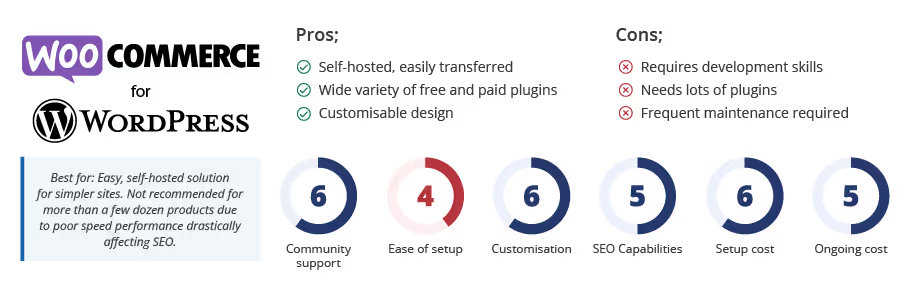
WordPress (WooCommerce).
Arguably the most popular platform on the planet, WordPress does a great job of being able to add a lot of features quickly and easily. It is a great platform for brochure websites and about 40 percent of the sites we build at Kook.
However, WordPress was never built with eCommerce in mind. Because it was built as a blogging platform, its database structure has serious page speed drawbacks for all but the simplest product structures. Slow pages mean poor rankings, less organic traffic, fewer customers, and fewer sales.
WooCommerce is an open-source eCommerce solution built on top of WordPress. While it is used for 99 percent of WordPress stores worldwide, that does not mean it is the best.
WooCommerce sites often become bogged down with bloated code and require a lot of ongoing maintenance due to plugins, themes, and moving parts.
It does offer more than 100 payment gateways and does not charge additional transaction fees beyond the standard fees of the payment providers.
You also own the website code and can host it anywhere.
WordPress Pros and Cons.
Webflow.
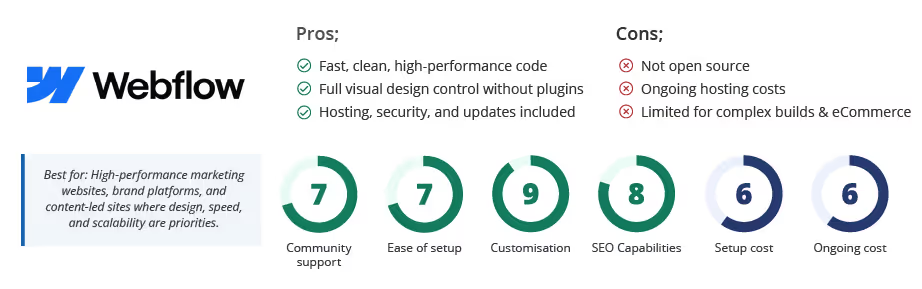
Webflow is a modern visual web platform that sits between traditional CMS tools and custom development. It allows us to design, build, and launch websites without relying on heavy plugins or patched-together solutions.
It is built for performance, flexibility, and clean code. Pages load quickly, layouts are responsive by default, and the underlying HTML, CSS, and JavaScript are production-ready. These features make Webflow well suited to marketing sites, brand platforms, and content-led websites where speed and design control matter.
Webflow’s CMS is powerful but structured. Content editors can update pages, collections, and components without affecting layouts, while designers retain full control over the visual system. This keeps sites consistent and easier to maintain over time.
As a hosted platform, Webflow manages security, updates, and infrastructure. There is no need to maintain servers, install updates, or handle compatibility issues linked to third-party plugins.
Webflow isn’t the right fit for every build. For complex eCommerce or advanced custom logic, another platform may be more appropriate. For businesses that value speed, design flexibility, and a stable editing experience, it is a strong and dependable option.
Webflow Pros and Cons.
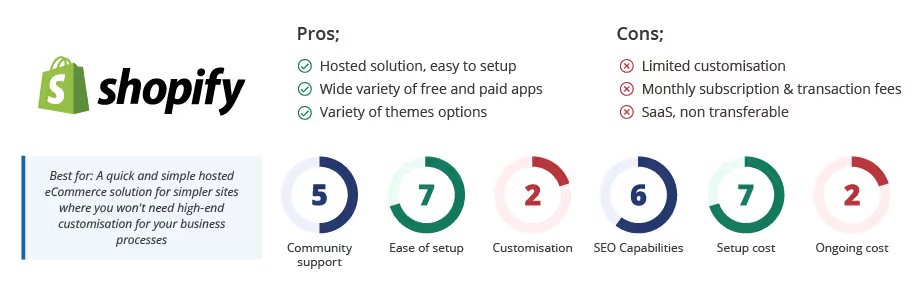
Shopify.
Shopify is an all-in-one hosted eCommerce platform geared towards users who want ease of use and a basic storefront.
It charges a monthly subscription from USD $29 to USD $299 and can also charge additional transaction fees when using third-party gateways.
Shopify has strong limitations in checkout customisation and relies heavily on paid apps for functionality, which can increase costs and slow the site.
It is SaaS, which means you do not own the code and cannot move the site elsewhere.
Shopify Pros and Cons.
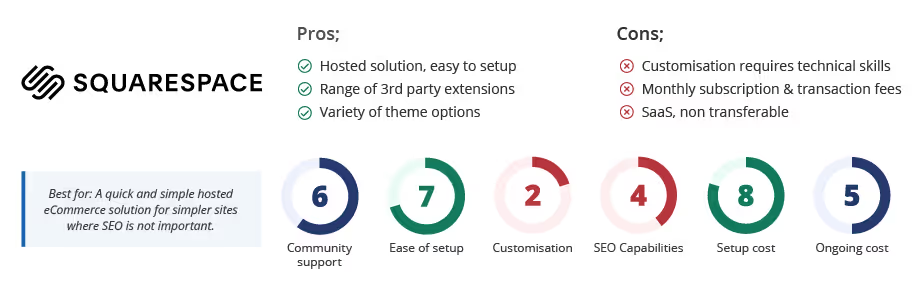
Squarespace.
Squarespace is a hosted subscription platform known for ease of use but limited design flexibility without developer input.
It is suitable for DIY websites but limited for advanced layouts and custom features.
Squarespace charges transaction fees on some plans and has limitations around deeper development.
It is also SaaS, meaning you do not own the code and cannot move the site elsewhere.
Squarespace Pros and Cons.
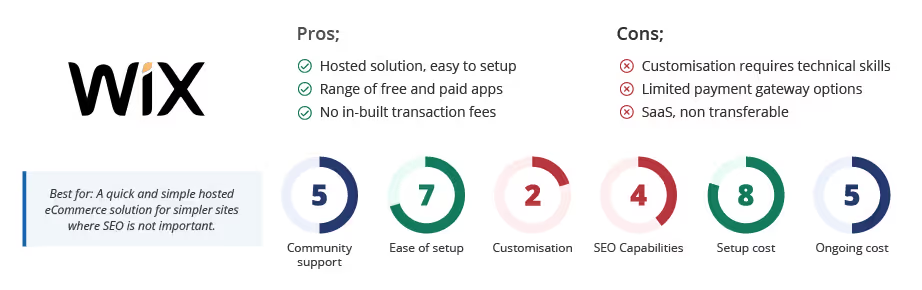
Wix.
Wix is a DIY drag-and-drop builder suitable for simple sites. It offers a subscription model and a range of paid apps.
It is not compatible with Apple Pay or Amazon Pay and has development limitations.
Wix is SaaS, meaning you do not own the code and the site cannot be migrated elsewhere.
Wix Pros and Cons.
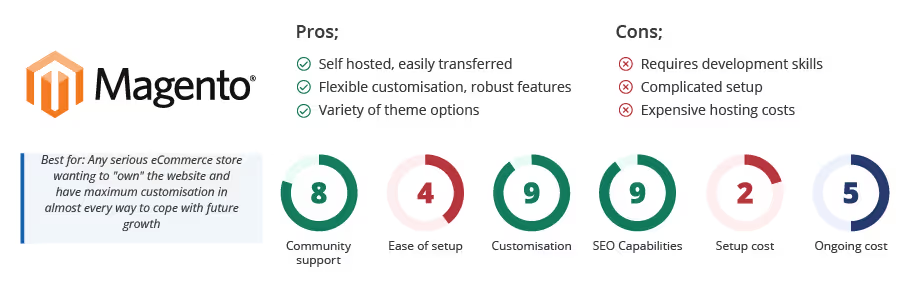
Magento.
Magento is an eCommerce-first open-source platform built for advanced, scalable online stores.
It supports complex catalogue structures, multiple currencies, discounts, stock control, and advanced features.
Magento requires developer involvement, dedicated hosting, and a higher initial build cost, but offers the most robust long-term customisation.
Magento Pros and Cons.
We're ready to move,
are you?
No lock-in contracts.
No outsourcing.