
Shopify Website - Assign Collaborator Access
Grant access to your Shopify website.
Follow the steps below to give collaborator access:
- Simply navigate to https://www.shopify.com/admin and login with your Shopify details.
- From your Shopify admin, go to ‘Settings’ at the bottom of the left-hand menu, then ‘Users’.
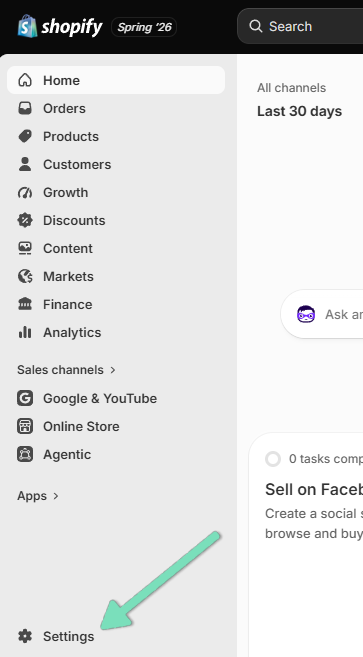
- If your store is part of an organisation, then click ‘Users’. If your store is not part of an organisation, then click ‘Users & permissions’.
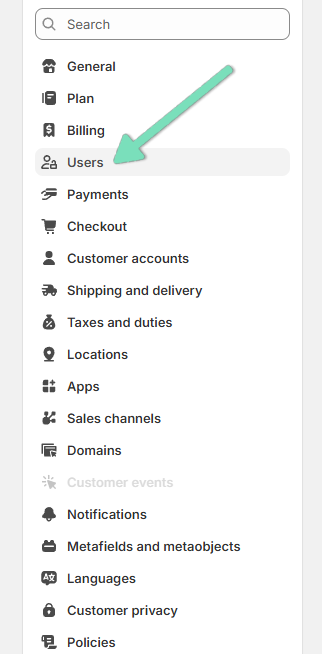
- Click ‘Security’.
- Copy the 4-digit code and email to your project manager along with your store URL.
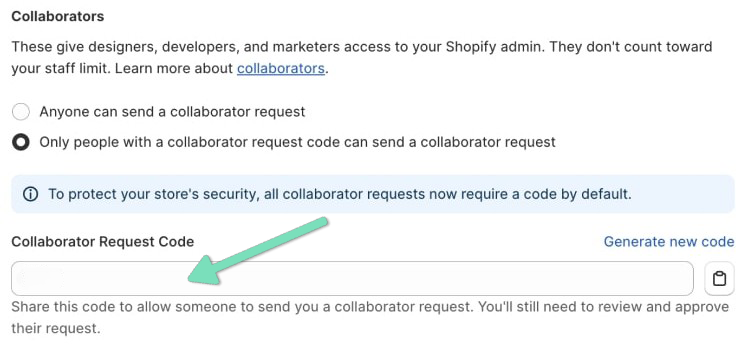
- Your project manager will use the 4-digit code to submit a collaborator request.
- Once the request has been submitted, you will receive an email and notification in your Shopify admin.
- Once you receive a notification of a collaborator requesting access, click ‘Review request’.
- At this stage, you can review the requested permissions.
- Click ‘Accept request’.
Great job! You’ve added us as a collaborator to your Shopify website.
We're ready to move,
are you?
No lock-in contracts.
No outsourcing.
Thank you! Your submission has been received!
Oops! Something went wrong while submitting the form.